建站紀錄|從 Hugo 初始化到 GitHub 自動部署
📂 專案內容
- Hugo 架站
- 主題採用 PaperMod
- 使用 GitHub Pages 上線
- GitHub Actions 自動部署(CI/CD)
✅ 步驟流程與操作紀錄
Step 1:Fork PaperMod 主題
- 到 PaperMod Github
- Fork 到自己帳號(保留原名
hugo-PaperMod)
Step 2:建立網站 repo
- 建立 repo:
你的帳號.github.io - 命名符合 GitHub Pages 的個人網域格式
Step 3:初始化 Hugo 專案
git clone https://github.com/你的帳號/你的帳號.github.io
cd 你的帳號.github.io
hugo new site . --force
Step 4:加入 submodule
設定submodule,指向最開始fork的專案主題
git submodule add https://github.com/你的帳號/hugo-PaperMod themes/PaperMod
git submodule update --init --recursive
Step 5:新增一篇測試貼文
- 從terminal下指令
hugo new test-post.md
- 或是直接在/content底下新增
test-post.md
+++
title = 'Test Post'
date = 2025-03-28T15:55:12+08:00
draft = true
tags =  ["Hugo", "test"]
+++

## 標題2
### 標題3

內文內文
Hugo 預設不會把「草稿(draft)」的文章部署上線,要調成false。
Step 6:設定toml/yml檔案
- 先按照官方文件設定yml檔案,由於
hugo new site預設使用hugo.toml,因此可以去麻煩GPT或是YML to TOML將yml檔案轉成toml格式。
放上一段最簡潔的可以試試看
baseURL = "https://你的帳號.github.io/"
title = "My Hugo Site"
theme = "PaperMod"
Step 7:地端測試執行
- 在terminal執行
hugo server -D
- 從http://localhost:1313/ 檢視執行起來的網頁
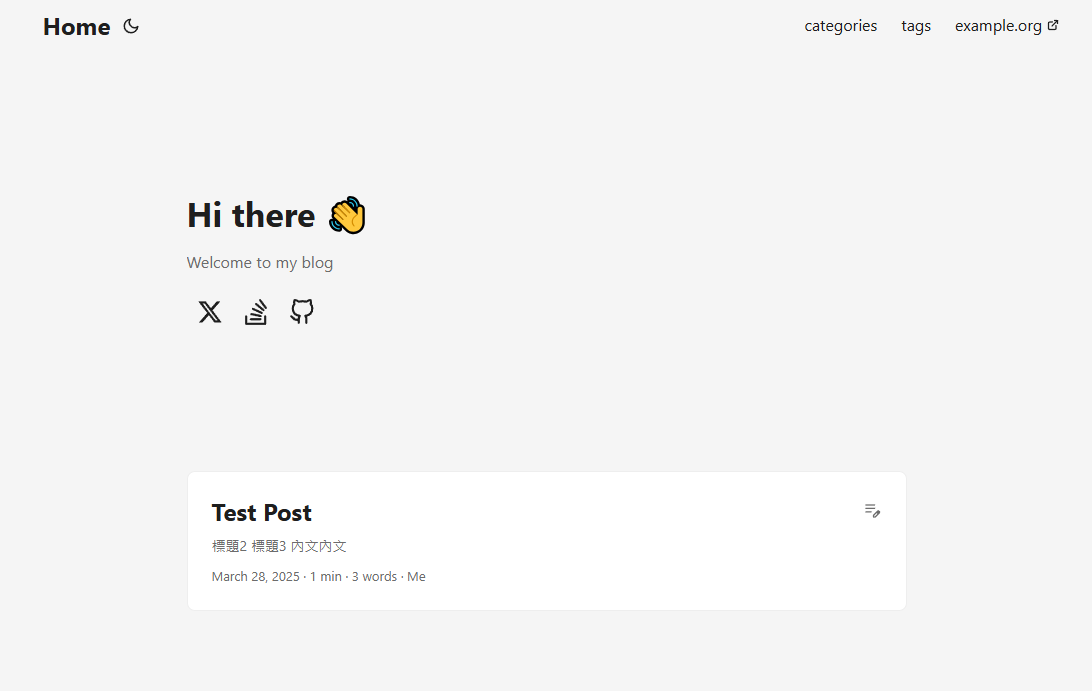
成功,準備開始部上GitHub了🎉🎉
Step 8:建立 GitHub Actions 自動部署
- 建立
.github/workflows/gh-pages.yml
name: Deploy to GitHub Pages

on:
  push:
    branches:
      - main

jobs:
  deploy:
    runs-on: ubuntu-latest

    steps:
      - name: Checkout
        uses: actions/checkout@v3
        with:
          submodules: true
          fetch-depth: 0

      - name: Setup Hugo
        uses: peaceiris/actions-hugo@v2
        with:
          hugo-version: '0.125.7' #帶入自己hugo的版本
          extended: true

      - name: Build site
        run: hugo --minify

      - name: Deploy
        uses: peaceiris/actions-gh-pages@v3
        with:
          github_token: ${{ secrets.GITHUB_TOKEN }}
          publish_dir: ./public
提供權限
前往
repo > Settings > Actions > General > Workflow permissions
-> 設定為Read and write permissions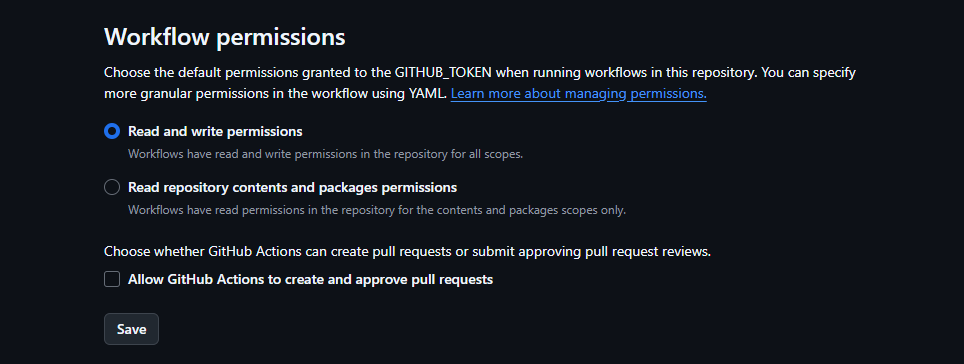
Step 9:部署與設定 GitHub Pages 分支來源
- 將專案推上github (這邊就不詳述了)
- 調整GitHub Pages 分支來源
Settings > Pages 選 Deploy from a branch
Branch 選 gh-pages,資料夾選 / (root)
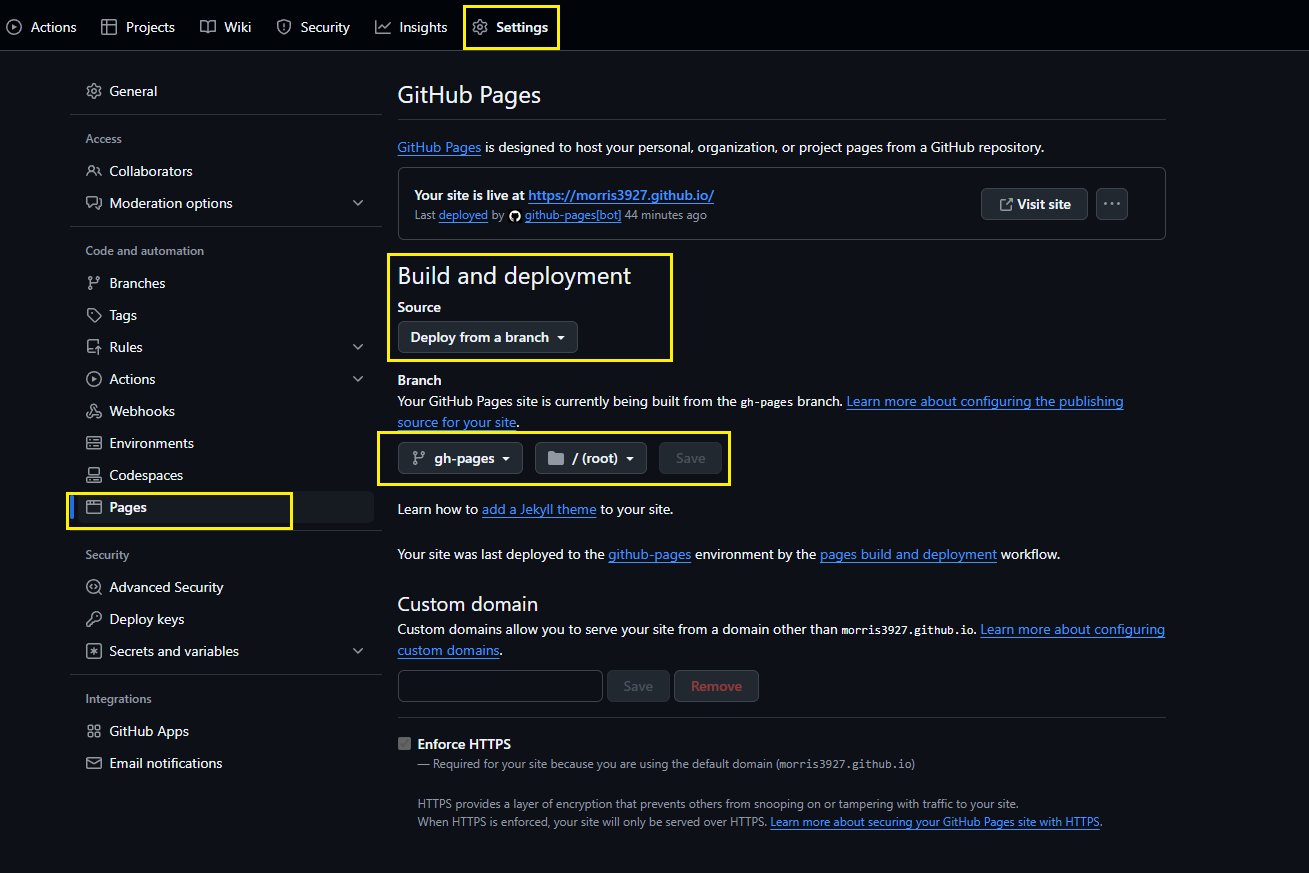
儲存後等個幾分鐘,就會成功顯示在github.io了!
🐞 過程中卡住的地方
| 階段 | 問題 | 解決 |
|---|---|---|
| 加入主題 submodule | 忘記執行 git submodule update --init --recursive | 補上後重新 push |
| Hugo build 失敗 | 使用舊版 Hugo (v0.119) | 升級至 v0.125.7 |
| GitHub Actions push 403 | 沒有 github-actions[bot] 權限 | 設為 Read and write permissions |
| Pages 顯示 README.md | Pages 預設使用 main 分支 | 改為 gh-pages / (root) |
| 頁面沒更新 | 瀏覽器快取 | 強制重新 Ctrl + F5 |